
For years, VMware was the default answer for enterprise virtualization. Reliable, widely supported, and deeply integrated into data centers across the Midwest, it was hard to argue with.
Then Broadcom acquired VMware in 2023. And for a lot of IT teams, the math stopped working.
Licensing was restructured. Perpetual licenses were discontinued. Pricing shifted to subscription bundles that forced customers to pay for features they’d never use. Renewal conversations that used to be straightforward became budget emergencies.
If you’re running VMware today, you may already be feeling the pressure. Here are five signs it’s time to start seriously evaluating your exit.
Sign #1: Your Renewal Cost Jumped Significantly
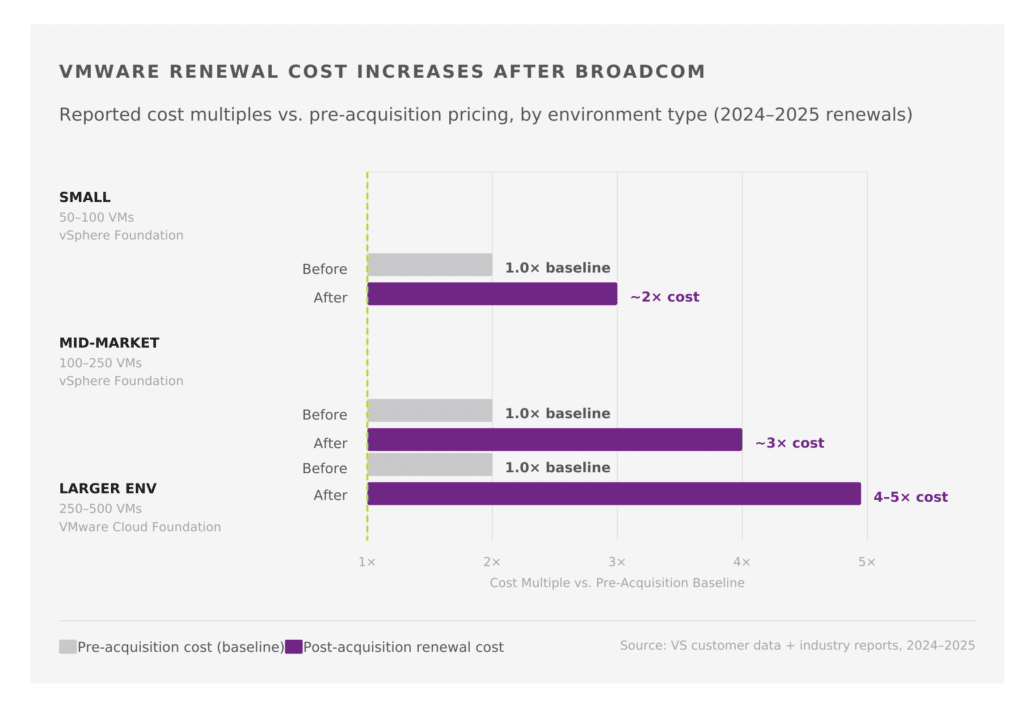
This is the most common trigger we’re hearing from Midwest IT teams right now. VMware customers who renewed in 2024 or 2025 reported cost increases ranging from 2x to over 5x their previous licensing costs, depending on their environment and prior agreement structure.
Broadcom’s licensing model shift, from perpetual to subscription and from à la carte to bundled tiers, means many organizations are now paying for vSAN, vRealize, and other components they have no use for, simply because that’s the bundle their workloads fall into.
“If your VMware renewal came back this year and the number made you pause, that pause is telling you something.”
The question isn’t whether the increase is “fair.” It’s whether the platform still justifies the cost relative to what you actually need it to do.
Sign #2: You’re Paying for Features You Don’t Use
Under Broadcom’s new structure, VMware is sold in tiered bundles: VMware vSphere Foundation and VMware Cloud Foundation are the two primary options. Both include components beyond core hypervisor functionality.
For smaller and mid-market environments, specifically the 50–500 VM range that describes most Midwest businesses, this creates a real problem. You may only need the hypervisor and basic management capabilities, but you’re being billed for the full stack.
Alternatives like Hyper-V (built into Windows Server, which you’re likely already licensing) and OpenStack eliminate that overhead entirely. If your VMware workloads are stable and not leveraging advanced VMware-specific features, the migration path is more straightforward than it might seem.
Sign #3: VMware Is Starting to Drive Your IT Budget Conversations
Healthy infrastructure cost should be largely invisible to your business; it’s a cost of operations, not a recurring budget crisis. When a single platform line item starts dominating quarterly IT budget reviews, that’s a sign the cost structure has gotten out of alignment.
We’re hearing from IT Directors who are now explaining VMware costs to CFOs and CEOs who had no idea what VMware even was two years ago. That dynamic, infrastructure costs rising to executive visibility, is a red flag.
“When the CFO starts asking questions about your hypervisor licensing, the migration conversation is already overdue.”
A migration isn’t free; there’s real cost in planning, execution, and protecting data through the cutover. But for most environments, that’s a one-time cost versus a recurring one that compounds every renewal cycle.
Sign #4: Your Workloads Don’t Actually Need VMware’s Differentiators
VMware has real strengths worth acknowledging: vMotion live migration, DRS, fault tolerance, and deep vSAN integration are genuinely useful for specific use cases. Large, high-availability environments with complex workload balancing requirements get real value from them.
But most mid-market Windows environments don’t rely heavily on those features in day-to-day operations. If your workloads are stable, your VMs are mostly Windows Server instances, and you’re not doing sophisticated cross-host load balancing, you may be paying for a Ferrari to drive to work every day.
Hyper-V handles that commute just fine. So does OpenStack for organizations that want more control over their infrastructure stack. The question worth asking: what would you actually lose in a migration, and is it worth the ongoing premium?
Sign #5: You’re Already Evaluating Your Backup and DR Strategy
Backup and disaster recovery conversations are a natural forcing function for infrastructure review. If you’re already looking at your backup environment, whether evaluating Veeam, assessing your recovery objectives, or rethinking your DR architecture, you’re already doing most of the groundwork a migration assessment requires.
You have a current VM inventory. You’re thinking about dependencies. You’re asking how long recovery takes and what your acceptable downtime window is. That’s exactly the foundation a migration plan is built on.
For organizations working through a backup or DR assessment with a partner like VS, layering in a VMware migration evaluation costs very little additional effort, and the data you gather informs both decisions.
“If you’re already inventorying your environment for backup purposes, a migration assessment is 80% of the way done.”
So What Do You Do With This?
If two or more of these signs apply to your environment, it’s worth having a real conversation about your options, not to commit to anything, but to understand what a migration would actually cost and involve for your specific workloads.
At Virtual Systems, we’ve been helping Midwest businesses run on virtualized infrastructure for years. We’re a Veeam Platinum VCSP, which means we have deep experience protecting workloads through transitions like this. When we do a migration, Veeam is protecting the move the entire time, so there’s no window where your data is unprotected.
We offer a free migration estimate for organizations evaluating a VMware exit. It’s a straightforward conversation: tell us your environment, and we’ll tell you what the move looks like, what it costs, and how long it takes.
Facing unexpected VMware cost increases after Broadcom’s acquisition?
Virtual Systems offers a free migration assessment to move your workloads to Hyper-V or OpenStack, with Veeam protecting every step of the move.
Still running VMware and not ready to move? That’s fine too; VS supports VMware-based VPS hosting and will continue to do so. But if Broadcom’s pricing is putting pressure on your budget, you have more options than you might think.
Share
Resources + Updates