

Secure Cloud Backup
Enterprise-grade security

Compliance Ready
Meet regulatory requirements

Trusted by IT Teams
Thousands of organizations

Fast Deployment
Set up in minutes
Comprehensive Microsoft 365 Backup
Protect all your critical Microsoft 365 workloads with automated, reliable backup

Exchange Online Backup
Protect emails, calendars, contacts, and tasks. Restore individual and entire mailbox.

SharePoint Online Backup
Backup sites, lists, libraries, and permissions. Recovery at any level at any time.

OneDrive for Business Backup
Secure user files and folders with automated backup. Quick level restore.

Microsoft Teams Backup
Protect channels, conversations, files, and tabs. Never lose critical data.
Why Native Microsoft 365 Protection Isn’t Enough
Microsoft provides platform availability, but data protection is your responsibility

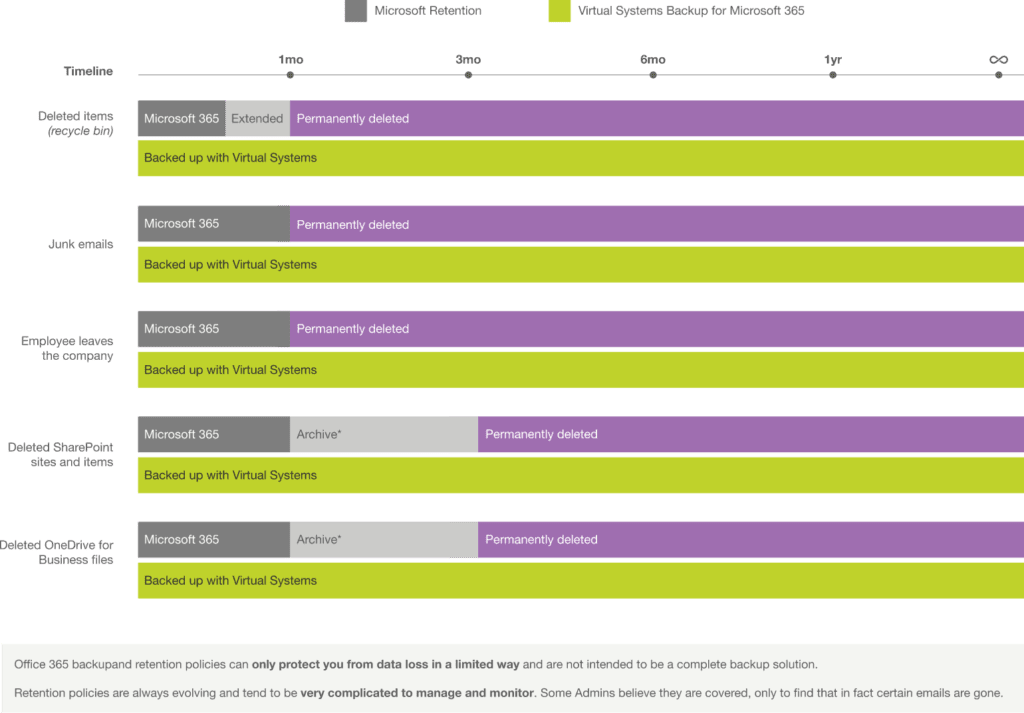
Limited Retention
Microsoft’s retention policies are limited. Deleted items are only recoverable for 30-93 days. Then, they’re gone forever.

Ransomware Risk
Ransomware can encrypt or delete your cloud data. Without backups, you have no way to recover without paying attackers.

Accidental Deletion
Users accidentally delete important files, emails, or entire sites. Malicious insiders can cause data loss.

Shared Responsibility Model
Microsoft ensures platform availability but you’re responsible for protecting your data and compliance.
How It Works
Get started with Microsoft 365 backup in four simple steps

Connect Microsoft 365
Securely connect your Microsoft 365 tenant in minutes using OAuth authentication.

Select Users and Workloads
Choose which users and workloads to protect: Exchange, SharePoint, OneDrive, Teams.

Automatic Backups Begin
Scheduled backups run automatically. Monitor progress from the central dashboard.

Restore Anytime
Quickly restore individual items, mailboxes, sites, or entire tenants when needed.
Enterprise-Grade Security & Compliance
Built to meet the highest security and compliance standards

Encryption at Rest and in Transit
AES 256-bit encryption for stored data and TLS 1.2+ for data in transit.

Role-Based Access Control
Granular permissions and multi-factor authentication for all users.

Immutable Backups
Write-once, read-many, storage prevents tampering and ransomware encryption.

Audit-Ready Logs
Comprehensive logging of all backup and restore activities for compliance.
Compliant with
GDPR
Compliant with
HIPAA
Compliant with
SOC 2
Get Started